Overview
The app’s purpose is to streamline employee reporting and facilitate efficient communication between employees and employers. It provides a user-friendly platform for employees to submit reports and allows employers to manage and respond to those reports effectively. The app aims to improve transparency, accountability, and workplace safety within organizations.
Challenges
In my participation in the project, my focus was on solving problems from three different perspectives: troubleshooting, usability, and security. Unlike typical applications, the primary goal was not conversion or sales, but rather enhancing the usability of the website and ensuring its security. Given the sensitive nature of the data involved, any potential leaks could have significant consequences for the company. Therefore, my efforts were directed towards implementing robust security measures and improving the overall user experience to mitigate these risks and ensure a safe and user-friendly environment for the application.
Employer’s perspective
- Confusing navigation: Employers struggle to navigate the app due to unclear menus and navigation elements.
- Inefficient task management: Employers find it difficult to track and manage the status of employee reports effectively.
- Lack of visual hierarchy: Important elements blend in with less relevant information, making it hard for employers to prioritize tasks.
- Inconsistent design patterns: Design inconsistencies create confusion and cognitive overload.
- Inadequate feedback and confirmation: Employers lack clear feedback on their actions within the app.
Employer’s perspective
- Confusing navigation: Employers struggle to navigate the app due to unclear menus and navigation elements.
- Inefficient task management: Employers find it difficult to track and manage the status of employee reports effectively.
- Lack of visual hierarchy: Important elements blend in with less relevant information, making it hard for employers to prioritize tasks.
- Inconsistent design patterns: Design inconsistencies create confusion and cognitive overload.
- Inadequate feedback and confirmation: Employers lack clear feedback on their actions within the app.
Security
Challenges with WordPress in the app:
- Lack of Native Encryption: WordPress lacks built-in encryption mechanisms for sensitive data, exposing it to potential breaches.
- Shared General Database: The default setup uses a single database for all users, increasing the risk of compromising multiple sites simultaneously.
- Vulnerabilities in Third-Party Plugins and Themes: Relying on external plugins and themes can introduce security vulnerabilities if not regularly updated.
- File Upload Risks: WordPress allows file uploads without strict security measures, enabling the potential execution of malicious scripts or dissemination of infected files.
- Brute-Force Attacks: WordPress is a frequent target for brute-force attacks due to weak login credentials and limited protection against multiple login attempts.
- Inadequate User Role Management: Insufficient control over user roles and permissions can lead to unauthorized access and data leakage.
- Absence of Two-Factor Authentication: WordPress lacks native support for two-factor authentication, increasing the risk of compromised accounts.
- Dependency on Shared Hosting: Shared hosting environments can compromise overall security, as vulnerabilities in one site can impact others on the same server.
Approach
Approach to UX problems
Research Limitations: Acknowledge the limitations of available research tools and focus on alternative methods such as direct customer interactions, surveys, bug reports, and feedback from manual testers.
- Customer Engagement: Engage with customers through interviews and surveys to gather qualitative insights into their experiences, pain points, and suggestions for improvement.
- Bug Reports and Feedback: Analyze bug reports and feedback from users and manual testers to identify recurring issues and areas of improvement.
- Issue Listing: Create a comprehensive list of identified issues based on customer feedback, bug reports, and manual testing findings. Prioritize the issues based on their impact and frequency.
- Potential Solutions: Brainstorm potential solutions for each identified issue, considering user feedback and industry best practices. Evaluate the feasibility and impact of each solution.
- Manual Testing and User Interviews: Conduct manual testing sessions with representative users and engage in user interviews to gather feedback on proposed solutions and validate their effectiveness.
- Implementation of Solutions: Implement the selected solutions based on the prioritized issues and user feedback. Collaborate with the development team to ensure proper integration and execution.
- Feedback Collection: Collect feedback from users and stakeholders after implementing the solutions. Monitor user satisfaction, identify any new issues, and gather suggestions for further improvements.
Approach to Security problems
- Identify Vulnerabilities: Perform a thorough security audit to identify existing vulnerabilities in the WordPress installation, themes, and plugins.
- Update WordPress and Plugins: Ensure that WordPress core and all installed plugins are up to date with the latest security patches and bug fixes.
- Secure Hosting Environment: Choose a reputable and secure hosting provider that offers robust security measures, such as firewall protection, malware scanning, and regular backups.
- Implement Strong User Authentication: Enforce strong password policies, encourage the use of two-factor authentication, and limit access to privileged accounts.
- Secure File and Directory Permissions: Set appropriate file and directory permissions to prevent unauthorized access and modification of critical files.
- Implement Web Application Firewall (WAF): Install and configure a web application firewall to protect against common web-based attacks, such as SQL injection and cross-site scripting (XSS).
- Encrypt Sensitive Data: Implement encryption mechanisms to protect sensitive data, such as user information and database contents, both at rest and in transit.
- Regularly Backup and Monitor: Set up automated backups of the WordPress database and files, and implement a monitoring system to detect and respond to any security incidents.
- Train Users on Security Best Practices: Educate website administrators and users on security best practices, such as avoiding suspicious links, using secure passwords, and being cautious with file uploads.
- Remove Redundant Plugins, Functionalities, and Dead Code: Conduct a thorough review of the WordPress installation and remove any unused or unnecessary plugins, functionalities, and code that could pose potential security risks.
UX Solutions
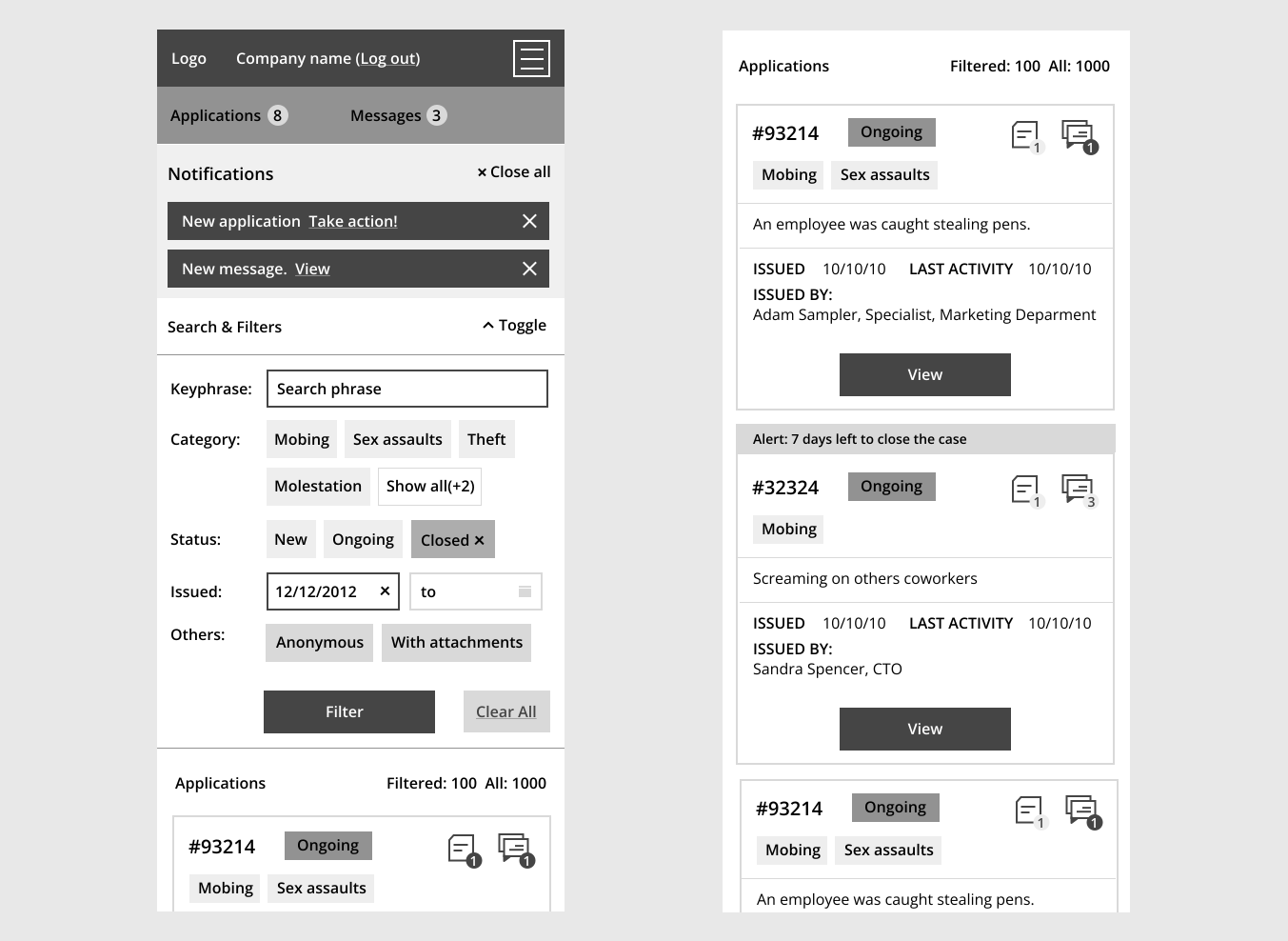
UX Solutions for Employer’s Dashboard
Functional Enhancements:
- Streamline Navigation: Simplify the dashboard’s navigation by organizing features and functions into logical categories and providing clear and intuitive menu options.
- Improve Filtering Options: Enhance the dashboard’s filtering capabilities to allow employers to easily sort and filter applications, notifications, and conversations based on relevant criteria such as status, date, or employee name.
- Integrate Real-Time Notifications: Implement a real-time notification system that alerts employers about new applications, messages, and pending actions, improving their ability to stay informed and respond promptly.
- Optimize Chat Functionality: Enhance the chat feature within the dashboard, ensuring that employers and employees can easily communicate, view previous messages, and receive notifications for new chat messages.
- Easy PDF Report Generation: Implement a user-friendly and efficient mechanism for employers to generate PDF reports of applications, allowing them to easily save or print comprehensive summaries of employee submissions.
- Safe Application Archiving: Provide a secure and straightforward method for archiving applications, ensuring that employers can store and access past application records easily while maintaining data privacy and integrity.
- Multilingual Version: Develop a multilingual version of the dashboard to cater to employers who prefer to use the application in languages other than the default language, enhancing accessibility and usability for a wider user base.
- Report Bug/Problem Feature: Integrate a feature that allows employers to easily report bugs or problems encountered within the dashboard, ensuring prompt resolution of issues and continuous improvement of the user experience.
Visual Enhancements:
- Create Visual Hierarchy: Use visual design techniques such as color, typography, and spacing to establish a clear hierarchy of information, making it easier for employers to quickly find and prioritize relevant tasks and notifications.
- Organize Information and Conversations: Implement a structured layout for displaying information and conversations, ensuring that relevant details are prominently displayed and that conversations are organized chronologically and easy to follow.
- Provide Clear Action Cues: Use visually distinct buttons, icons, or labels to guide employers in taking specific actions, such as changing application status, adding notes, or attaching files.
Design good practices for users dashboards:
- Consistency
- Simplicity
- Clear Navigation
- Visual Hierarchy
- Responsive Design
- User Feedback
- Customization Options
- Data Visualization
- Accessibility
- User Testing
UX Solutions for Employee’s form
Functional Enhancements:
- Clear and intuitive form layout: Design the form with a logical and organized structure, grouping related fields and providing proper spacing and alignment.
- Proper validation and error messaging: Implement real-time validation to ensure that users provide accurate and complete information. Display clear error messages to guide users in correcting any mistakes.
- Progress indicators to guide users through the form: Show users their progress within the form by indicating the current step and providing a clear overview of the remaining steps.
- Responsive design for mobile-friendly experience: Ensure the form is optimized for mobile devices, adapting to different screen sizes and offering a seamless experience for users on smartphones and tablets.
- Clear instructions and tooltips for each form field: Provide concise and easy-to-understand instructions or tooltips next to each form field to assist users in filling out the form correctly.
- Smart defaults and pre-populated fields where possible: Populate certain form fields with default values based on the user’s profile or previous selections to minimize user effort and enhance the form completion process.
- Accessible form elements and labels: Ensure that form elements have appropriate labels, are properly structured, and adhere to accessibility guidelines to accommodate users with disabilities.
- Localized language and error messages: Provide language options and display error messages in the user’s preferred language to cater to a diverse user base and improve comprehension.
- Option to attach supporting documents or files: Allow users to upload and attach any necessary supporting documents or files to provide additional context or evidence.
- Confirmation message upon successful form submission: Display a clear confirmation message or provide an email notification to reassure users that their form has been successfully submitted.
- Secure storage of submitted data: Implement robust data security measures to ensure the confidentiality and integrity of the submitted information, protecting sensitive data from unauthorized access or breaches.
Visual Enhancements:
- Clear and modern form design with visually appealing elements: Create a visually pleasing form interface that is aesthetically appealing and engages users.
- Consistent and cohesive color scheme and typography: Choose a harmonious color palette and typography styles that align with the overall branding and create a cohesive visual experience.
- Appropriate use of white space to reduce visual clutter: Utilize white space effectively to provide breathing room between form elements and improve overall readability and comprehension.
- Visual cues to highlight required fields and optional fields: Use visual indicators such as asterisks or icons to clearly differentiate between mandatory fields that must be filled and optional fields.
- Responsive design for optimal viewing on different devices: Ensure that the form is responsive and adapts seamlessly to various screen sizes, including desktop, tablet, and mobile devices.
- Readable font sizes and typography hierarchy for easy comprehension: Select appropriate font sizes and establish a clear typographic hierarchy to facilitate easy reading and understanding of form labels, instructions, and input fields.
- Logical grouping and organization of form sections: Group related fields together and arrange them in a logical order that follows the natural flow of information, making it easier for users to navigate and complete the form.
- Intuitive icons and graphics to aid in understanding form actions: Incorporate intuitive icons or visual cues to assist users in understanding the purpose and functionality of different form elements, buttons, or actions.
- Thoughtful use of visuals to guide users through the form process: Use visual elements such as progress bars, step indicators, or section separators to visually guide users through the form, helping them understand their progress and what steps remain.
- Use of progress bars or step indicators to show form completion status: Provide a visual representation of the form completion status to give users a sense of progress and a clear understanding of how much more they need to complete.
- Attention to visual accessibility guidelines for users with visual impairments: Ensure that the form design meets accessibility standards, such as providing sufficient color contrast, alternative text for images, and keyboard navigation support.
- Consistent styling and alignment of form elements: Maintain a consistent visual style and alignment across all form elements to create a cohesive and professional appearance.
- Well-designed buttons and form controls for clear interaction: Design buttons and form controls in a visually distinct and consistent manner, ensuring they are easy to identify and interact with.
Security solutions
Work plan
- Risk Assessment and Threat Modeling
- Identifying Potential Security Risks
- Assessing the Impact and Likelihood of Threats
- Prioritizing Security Risks
- WordPress Core Security
- Keeping the WordPress Core Up-to-Date
- Applying Security Patches and Updates
- Enabling Automatic Updates
- Removing Unused Themes and Plugins
- Secure Configuration
- Securing the wp-config.php File
- Changing Default Database Prefix
- Restricting File and Folder Permissions
- Disabling File Editing from the WordPress Dashboard
- User Authentication and Access Control
- Implementing Strong Password Policies
- Enforcing Two-Factor Authentication (2FA)
- Limiting Login Attempts and Implementing Account Lockouts
- Assigning Appropriate User Roles and Permissions
- Web Application Firewall (WAF) Implementation
- Understanding the Role of a Web Application Firewall
- Selecting and Configuring a WAF Solution
- Setting Up WAF Rules and Filters
- Monitoring and Logging WAF Events
- Database Security
- Securing the WordPress Database
- Implementing Encryption for Database Storage
- Regular Database Backups
- Database Monitoring and Auditing
- Secure Handling of File Uploads
- Validating File Types and Sizes
- Uploading Files to Non-Web Accessible Directories
- Implementing File Upload Security Plugins
- Regular File Integrity Checks
- Continuous Monitoring and Incident Response
- Implementing Security Monitoring Tools
- Configuring Intrusion Detection and Prevention Systems
- Establishing an Incident Response Plan
- Conducting Regular Security Audits
- Conclusion
- Summary of Security Enhancements
- Future Considerations for Ongoing Security Maintenance
Securing the WordPress Database
- Implement strong database credentials and passwords.
- Ensure the database server is running on a secure network.
- Restrict access to the database by allowing only authorized users and IP addresses.
- Regularly update the database management system to the latest version.
Implementing Encryption for Database Storage:
- Encrypt sensitive data stored in the database using strong encryption algorithms.
- Utilize encryption libraries or plugins to handle encryption and decryption processes.
- Keep encryption keys secure and separate from the database.
- Regularly review and update encryption mechanisms to ensure data remains protected.
Regular Database Backups
- Set up automated backup processes to regularly backup the WordPress database.
- Store backups in a secure location, separate from the live database.
- Perform periodic test restores to ensure the integrity and validity of backups.
- Implement a backup retention policy to manage and delete outdated backups.
Encryptions key management
To implement proper key management practices for securely storing and managing encryption keys, follow these steps:
- Generate strong keys using a reliable algorithm.
- Encrypt the encryption keys using a separate master key or passphrase.
- Store the encrypted keys in a secure location such as a hardware security module (HSM) or a secure key management system.
- Limit access to the keys to authorized personnel using role-based access control (RBAC).
- Regularly rotate the encryption keys to mitigate long-term exposure.
- Monitor key usage and detect any suspicious activities.
- Implement a backup strategy for the keys and periodically test the recovery process.
- Conduct audits to ensure compliance with security standards and regulations.
System scheme
Code samples
function your_encryption_function($data, $key) {

$iv_length = openssl_cipher_iv_length('AES-256-CBC');

$iv = openssl_random_pseudo_bytes($iv_length);

$encrypted_data = openssl_encrypt($data, 'AES-256-CBC', $key, OPENSSL_RAW_DATA, $iv);

$encrypted_data = base64_encode($iv . $encrypted_data);

return $encrypted_data;

}
add_action(‘save_post’, ‘encrypt_and_save_post_meta’, 10, 3);
// Check if the post type is the one you want to encrypt the data for
if ($post->post_type === ‘your_post_type’) {
// Get the data to be encrypted from the $_POST or $_REQUEST global variable
$data_to_encrypt = $_POST[‘your_data_field’];
$encrypted_data = your_encryption_function($data_to_encrypt, $key);
update_post_meta($post_id, ‘your_meta_key’, $encrypted_data);
}
}
$data = base64_decode($encrypted_data);
$iv_length = openssl_cipher_iv_length(‘AES-256-CBC’);
$iv = substr($data, 0, $iv_length);
$encrypted_data = substr($data, $iv_length);
$decrypted_data = openssl_decrypt($encrypted_data, ‘AES-256-CBC’, $key, OPENSSL_RAW_DATA, $iv);
return $decrypted_data;
}
function get_decrypted_meta_value($post_id, $meta_key) {
$encrypted_meta_value = get_post_meta($post_id, $meta_key, true);
return ”; // Return empty string if no meta value found
}
$key = get_user_meta($user_id, ‘encryption_key’, true);
return ”; // Return empty string if encryption key not found for the user
}
}
Summary
In summary, this case study focused on enhancing the security and user experience of a WordPress-based web application. The project addressed various security risks by prioritizing security measures such as keeping the WordPress core up-to-date, securing the wp-config.php file, implementing strong password policies, and using a web application firewall (WAF). Database security was improved through encryption, regular backups, and monitoring. File upload security and continuous monitoring were also implemented.
From a user experience perspective, the employer’s dashboard was enhanced with features such as easy generation of PDF reports, secure archiving of applications, and a bug reporting system. The design of the dashboard emphasized visual clarity, clear hierarchy, and efficient navigation. The employee’s form was improved with a multi-step layout, validation, and progress indicators to streamline the submission process.
Challenges specific to WordPress, such as its vulnerabilities and the need for careful configuration, were addressed by removing redundant plugins, securing the database, and implementing proper encryption practices. The use of WordPress presented certain limitations, but through careful planning and implementation, the project successfully achieved the desired level of security and user experience.
The approach to solving UX problems involved conducting research through customer surveys, feedback from bug reports, and manual testing. Functional and visual enhancements were implemented based on user feedback, resulting in improved usability, better visual hierarchy, and a more organized interface.
Overall, this project required a comprehensive understanding of WordPress security, user experience best practices, and the specific needs of the web application. The collaboration between the designer and developer was instrumental in identifying and addressing the challenges associated with WordPress, ultimately resulting in a secure and user-friendly web application.